Scanning your Wifi for potential issues is quick and easy
Follow these simple steps in the 2degrees app
1. Download the 2degrees app
- Search ‘2degrees’ on the Google Play Store or Apple App Store. The app icon should look like the image to the right.
- Sign in using your 2degrees account email address and password.
Tip: Make sure you’re using the latest version of the app for the best experience

2. Open the Broadband section
- Go to the Services section at the bottom left of your screen
- Tap on the Broadband tab at the top of the screen and scroll down to find the WiFi Scan
Tip: Make sure you’ve selected the Broadband service in the app and are using the latest version of the 2degrees app.
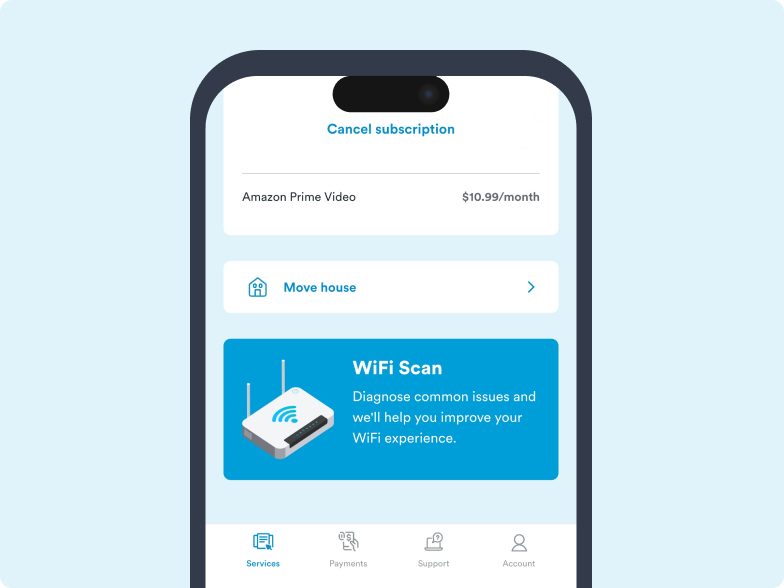
3. Start a Wi-Fi scan
- Tap the WiFi Scan card
- Follow the step-by-step instructions in the app. The scan will measure your WiFi signal and identify the best location for your modem
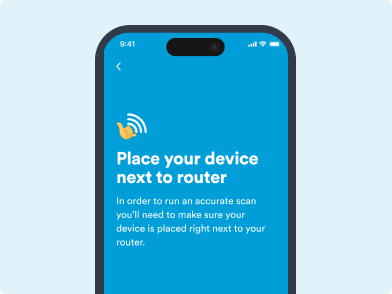
4. Review your results
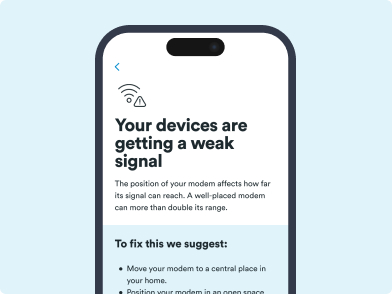
Once your scan is complete, we'll show you:
- Areas with strong and weak WiFi coverage
- Recommendations to improve your WiFi signal
Note: If your WiFi still isn't performing as expected, it may be caused by your device, interference, or an outage. Please contact our support team if further assistance is needed.
Article last updated on